
Looking for Help?
Find answers to your questions
- Why doesn't my camera work during the Operation Hours I set?
- How long can 8 AA batteries last in photo-only mode?
- Why does my camera get stuck on "PC Camera" during a firmware update?
- Why Does My Camera Fail to Turn On and Make a Buzzing Sound?
- Why Is My Camera Screen Flickering, White, or Black?
- Why Are My Camera Photos or Videos Black and White at Night?
- Why Does the Camera Only Take Photos or Record Short Videos?
- Does a lower firmware version number indicate a firmware downgrade?
- How to Choose the Right Solar Panel for Your GardePro Camera?
- What should I do if the camera keeps saying "No SD Card"?
- What Is GardePro Edge AI and How Does AI Work on Trail Cameras
- How to Choose Trail Camera Settings for Different Wildlife Scenarios
- What Should I Do If My Trail Camera Keeps Turning Off?
- How can I enable the time-lapse function on the camera?
- How can I set the camera to work at a specific time?
- Why is my camera not recognized when connected to my computer?
- Why Doesn’t My Camera Take Photos at Night?
- Why Do Video Numbers Mismatch and Videos Fail to Play?
- Why Does the Screen Show “MCU Upgrading” When the Camera Powers On?
- Battery life is shorter than expected
- Camera won't power up
- Can an external power source and internal 8 batteries work together?
- FAQ about GardePro 8000 mAh Rechargeable Battery Pack
- FAQ about SD Cards
- FAQ on Reducing Trigger Delays / Slow Trigger for Wildlife Trail Camera
- How to choose the right solar panel for your camera
- How to reset the password?
- How to troubleshoot condensate, fog, or moisture on the camera lens?
- How to use 12V AC/DC Power Adapter for GardePro A3, A3S
- LED Glass / PIR Sensor Broken
- Resolving "No Firmware Available" Message
- The Camera Date&Time not saved
- The camera leak
- The camera screen has stripes/lines
- The tracking camera shows "low voltage"
- Troubleshooting Temperature Display Issues
- When I turn on the camera, the screen just continually flashes white
- Why does the camera show a black and white image instead of color at startup
- Why is it that I turn the camera on but the screen doesn't light up, the screen is black.
- Amazon Replace/Resend the product
- How to assemble the wall mount and install a camera with the wall mount ?
- How to estimate the wireless communication distance?
- How to locate and solve the disconnection issue?
- How to use GardePro A3S ?
- Solutions to special cases when using the camera
- What is the GardePro T5 and T6 Series?
-
Trail Camera Photo&video Problems
- How to Improve Night Videos Too Dark
- Night Picture Background Too Dark? Here's How to Improve It
- The pictures are cut off by grey
- Troubleshooting Short Night Videos on Your Trail Camera
- Why are the colour tones of pictures taken by the same camera not uniform?
- Why Does “Invalid SIM Card” Appear on SIM-Free Cellular Cameras?
- Can I Track My Stolen Cellular Camera?
- What Happens to My Subscription if My 4G Cellular Camera Is Stolen?
- Why Does My Cellular Trail Camera Show an X Instead of a Signal Bar?
- Can I Transfer My Cellular Data Plan to a New Camera?
- How to Purchase a Cellular Data Plan Outside the GardePro App?
- Why Doesn’t the QR Code Work?
- Why Is the QR Code Not Showing on My Cellular Trail Camera?
- Can I Use an Add-On Without a Main Plan?
- Can I get a price adjustment for the wrong subscription purchase?
- Is there any obligation when I purchase a photo subscription?
- Why is there no sound in my video?
- How to cancel or remove a data plan?
- 4G module upgrade instructions
- Failed activation solution for GardePro cellular trail camera Pre-installed SIM card
- GardePro 4G Cellular LTE Data Plan
- GardePro Cellular Trail Camera Model Comparison
- GardePro Cellular Trail Camera Supported 4G LTE cellular networks
- GardePro cellular trail camera Unsupported SIM Cards for Freedom Model Cameras
- GardePro cellular trail camera's Cellular Transfer function
- GardePro cellular trail cameras activation notes
- GardePro X60P Live Max, X60PLMB, or X60 Pro Max experiences unreasonable false triggers
- Global 4G LTE cellular networks corresponding to SIM mode IR
- How to check if your country can use GardePro cellular trail camera
- How to quickly test if the Celluar trail camera is connected properly to the App
- How to select the Sim Mode on your mobile phone
- How to tell if your cellular Trail camera model
- What's special about Freedom Unlocked SIM-free model
- Why Does My GardePro X66 Pro Use Battery Faster
- X60P Live Max Quick Activation Guide
- Activate GardePro 4G Cellular LTE Trail Camera Freedom
- Celluar Camera firmware and MCU module upgrade
- GardePro Cellular Camera Model Comparison: X60PMB vs X50MB vs X20
- X66 Series Camera Activation Guide
- Why Are Only 40 Photos Showing in the App?
- Can I Turn Off My WiFi Camera Through the App?
- What Is the Difference Between a WiFi Trail Camera and a Home WiFi Security Camera?
- Can I use my WiFi camera as a non-cellular trail camera?
- Why Can’t I Connect to My WiFi Trail Camera on iOS 26?
- Why won’t my app connect to my WiFi trail camera?
- How to Update Firmware on WiFi Trail Cameras with Built-in Storage
- How to Fix Live View Issues on WiFi Trail Cameras (iPhone 17)
- Can I View Wi-Fi Trail Camera Photos Remotely?
- How to Live Stream on Twitch with the GardePro WiFi Camera
- How to Quickly Activate Your WiFi Camera?
- QUICK START GUIDE For Wi-Fi Trail Camera-WiFi-Trail-Camera-QUICK-START-GUIDE
- The difference between GardePro WiFi trail camera and GardePro cellular trail camera
- Understanding GardePro Wi-Fi & Bluetooth Connection Technology
- When the Wifi&Cellular camera encounters some unsolvable issues
- When the Wifi&Cellular camera encounters some unsolvable issues
- Why can't I use the Live stream of the WiFi camera (ios)
- Wi-Fi connected, but can't see any camera information and can't preview
- What Should I Do if the Link 1.0 Hub Firmware Update Fails at 100%?
- Do I Need to Request a Video Preview in the Link System?
- What Do the Hub Indicator Lights Mean During Troubleshooting?
- What Should I Do if My Hub Goes Offline After a Power Outage?
- What should I do if R3 Pro is stuck at 98% during firmware update?
- How is the Link Hub powered?
- What should I do if my paired R3 Pro camera frequently goes offline while the Hub stays online?
- Can I use the Link 1.0 Hub with other GardePro trail cameras?
- How do I determine my Link Hub's network connection status using the LED indicator lights?
- What if the Link Hub Shows a Solid Blue Light?
- Can I use an external antenna to improve the signal reception of my R3 Pro camera?
- What Does the Blinking Green Light on the Hub Mean?
- Why can't I add my Hub to the app?
- How to Set Up and Connect Your GardePro Link System: A Step-by-Step Guide
- Link 1.0 (R3 Pro+Hub)-FAQs
- R3 Pro Firmware Update Guide(Fix Network Issue)
- How Can I See the Solar Panel’s Battery Level in the App?
- How to Share Photos and Videos
- How Do I Add a Payment Method?
- How Do I Set a Default Payment Method?
- How Do I Remove a Payment Method?
- What Does Error 205 Mean When Using “Take a Photo”?
- Why am I not receiving the verification code email during registration or sign-in?
- GardePro Edge AI - FAQ
- AI Tags Feature Guide
- Smart Capture Feature Guide
- Take a Photo (Diagnostic) Feature Guide
- How to Request and Download HD Video Clips
- Camera Sharing Feature Guide
- Firmware Upgrade Reference Table for GardePro Trail Camera
- GardePro App for Cellular Trail Camera
- GardePro App for WiFi Trail Cameras?
- GPS Feature Guide
- How to clear GardePro app cache
- How to Download 4G Camera Photos or Videos to Your Phone Gallery
- How to resolve payment-related issues with the GardePro data plan
- How to select all and delete all in app gallery
- How to upgrade the firmware of GardePro trail cameras
- Shared Plan Guide
- Understand the Cellular transfer Settings in the GardePro Mobile App
- Understanding the Basic Settings and Advanced Settings in the GardePro Mobile App
- Video Preview Feature Guide
- How do GardePro gift cards work?
- Return shipping costs & conditions
- Can I change my shipping address after placing an order?
- Do you offer free shipping?
- How long does it take to process and ship my order?
- Why did my payment fail, and how can I fix it?
- Is my payment information secure?
- What payment methods do you accept?
- GardePro Credits Rewards Program Customer Guide: How to Earn & Redeem Credits
- GardePro Global Shipping Destinations and Delivery Times
- GardePro Warranty Information
- Return & Refund Policy
- What's the difference between Tax and Duty
- GardePro Mobilfunk-Trail-Kamera X20 Handbuch
- GardePro Mobilfunk-Trail-Kamera X20WF Handbuch
- GardePro Mobilfunk-Trail-Kamera X50 Handbuch
- GardePro Mobilfunk-Trail-Kamera X50MB Handbuch
- GardePro Mobilfunk-Trail-Kamera X60P Handbuch
- GardePro Mobilfunk-Trail-Kamera X60PLMB Handbuch
- GardePro Mobilfunk-Trail-Kamera X60PMB Handbuch
- GardePro Wildkamera A3S Handbuch
- GardePro Wildkamera A5 Handbuch
- GardePro Wildkamera A5WF Handbuch
- GardePro Wildkamera E5S Handbuch
- GardePro WLAN-Wildkamera E6 Handbuch
- GardePro WLAN-Wildkamera E6P Handbuch
- GardePro WLAN-Wildkamera E6PCF Handbuch
- GardePro WLAN-Wildkamera E6PMB Handbuch
- GardePro WLAN-Wildkamera E8 Handbuch
- GardePro WLAN-Wildkamera E8P Handbuch
- GardePro WLAN-Wildkamera E8PMB Handbuch
- GardePro WLAN-Wildkamera E8PWF Handbuch
- GardePro WLAN-Wildkamera E9 Handbuch
- GardePro WiFi Trail Camera E6 2.0 Instuction Manual
- GardePro WiFi Trail Camera A80 Instuction Manual
- GardePro WiFi Trail Camera E6 Instuction Manual
- GardePro WiFi Trail Camera E6P Instuction Manual
- GardePro Wifi Trail Camera E6PCF Instuction Manual
- GardePro WiFi Trail Camera E6PMB Instuction Manual
- GardePro WiFi Trail Camera E7 Instuction Manual
- GardePro WiFi Trail Camera E8 Instuction Manual
- GardePro WiFi Trail Camera E8P Instuction Manual
- GardePro WiFi Trail Camera E8PCF Instuction Manual
- GardePro WiFi Trail Camera E8PMB Instuction Manual
- GardePro Wifi Trail Camera E8PWF Instuction Manual
- GardePro WiFi Trail Camera E9 Instuction Manual
- GardePro WiFi Trail Camera E9P-E9PWF-E9PCF-E9P MAX Instuction Manual
- GardePro X60P-X60PWF-X60PCF-X60P MAX Manuale di istruzioni V1.0 EN+LT
- GardePro Cellular Trail Camera X20 Instuction Manual
- GardePro Cellular Trail Camera X20WF Instuction Manual
- GardePro Cellular Trail Camera X50 Instuction Manual
- GardePro Cellular Trail Camera X50MB Instuction Manual
- GardePro Cellular Trail Camera X60P Instuction Manual
- GardePro Cellular Trail Camera X60PLMB Instuction Manual
- GardePro Cellular Trail Camera X60PMB Instuction Manual
- GardePro Cellular Trail Camera X66 Pro Instuction Manual
- GardePro N5 NIGHT VISION GOGGLES Instruction Manual V1.0 EN 20240224
- GardePro Solar Panel SP300 Instruction_Manual_v1.0_EN
- GardePro Solar Panel SP350 Instruction_Manual_v1.0_EN
- GardePro Trail Camera A3S Instuction Manual
- GardePro Trail Camera A5 Instuction Manual
- GardePro Trail Camera A5WF Instuction Manual
- GardePro Trail Camera A60 4K Instuction Manual
- GardePro Trail Camera E5S Instuction Manual
- About Wall Mount Bracket Assembly
- Discover exclusive discounts for Gardepro
- Firmware Update for Camera
- Firmware Update for monitor
- GardePro Baby Monitor B3 - Instruction Manual
- GardePro Baby Monitor Product FAQ
- How to install a wall mount
- Q1: How to operate in the menu?
- Q10: Where to buy a camera?
- Q11: Will this work on the 5g network or the Wi-Fi network?
- Q12: Can it also connect to your phone?
- Q13: Does the camera part need to be plugged in?
- Q14: Will it block out the white noise machine?
- Q15: Will this camera notify you when there is motion in the room?
- Q16: What does the blinking green light on the baby unit camera mean?
- Q17: What is the resolution of the baby camera and monitor?
- Q18: How will the alarm/alert detection affect the system?
- Q19: How can I set the Sound detection?
- Q2: How to update the baby monitor?
- Q20: If the monitoring screen is not clear at night, the night vision effect is not good?
- Q21: If there exists a whistling/howling phenomenon after opening the monitoring screen?
- Q22: What if the surveillance screen is always black and white, or is it pitch black at night?
- Q23: How to turn on multiple cameras in Patrol/Scan mode?<
- Q24: How to place the camera on the wall?
- Q25: What is the longest connection distance?
- Q26: How to do when the monitor cannot turn on?
- Q27: What do the screen sleep parameters mean?
- Q29: Can I review the video a day before?
- Q3: How to play and stop lullabies?
- Q30: How can I copy the data from the camera to my phone / pc?
- Q31: How can I estimate the wireless communication distance betwwen the monitor and camera ?
- Q4: How to adjust the Speak/Talk volume of a camera?
- Q5: How to adjust the alarm volume of the monitor?
- Q6: How to adjust the lullaby volume of the camera?
- Q7: How to adjust the screen’s brightness?
- Q8: How can i add a new camera to the network?
- Q9: Is this monitor 720p or 1080p?
- Q19: How can I set the Sound detection?
- Q20: If the monitoring screen is not clear at night, the night vision effect is not good?
- Q21: If there exists a whistling/howling phenomenon after opening the monitoring screen?
X66 3.0 Ultra - Product Overview
Table of Contents
Product Overview
Released in 2026, the GardePro X66 3.0 Ultra is the flagship model of the X66 series, designed for users who demand maximum battery life, smarter monitoring, and long-term field performance.
The X66 3.0 Ultra combines EDGE AI intelligence, True 4K Ultra HD Video,Dual-Core Technology, and a revolutionary 17,500mAh rechargeable lithium battery system to deliver longer deployments with less maintenance.
The biggest upgrade is the included 17,500mAh High-Capacity Lithium Battery, providing dramatically extended runtime without the need to purchase additional batteries.
For users with moderate activity, the X66 3.0 Ultra can provide enough power for an entire season on a single charge. For high-traffic locations or year-round monitoring, pairing it with the optional SP1000 10W Solar Panel provides continuous power with minimal maintenance.
Feature Guide
17,500mAh Rechargeable Lithium Battery
Go longer. Maintain less.
The X66 3.0 Ultra comes with the newly designed 17500mAh High-Capacity Lithium Battery, delivering significantly longer runtime compared with traditional AA battery-powered trail cameras.
Battery advantages:
- 17,500mAh capacity
- 75Wh total energy
- Rechargeable up to 300 cycles
- Equivalent to approximately 5,000 AA batteries saved
- Removable battery design for convenient charging and replacement
- Supports fast charging for reduced charging time
Designed for every type of user:
- Occasional users: One full charge can last through an entire hunting season
- Heavy users: Pair with the SP1000 10W Solar Panel for year-round operation
Dual-Core Technology (No Missed Moments)
The X66 3.0 Ultra features advanced Dual-Core Technology, separating image processing and communication tasks for faster and more reliable performance.
Unlike traditional cameras that may pause motion detection while uploading images, the X66 3.0 Ultra can:
- Upload photos through cellular network
- Continue detecting motion simultaneously
- Capture more activity without interruption
This helps reduce missed captures during active wildlife movement.
EDGE AI (Smart Animal Recognition)
The X66 3.0 Ultra features GardePro EDGE AI, bringing intelligent recognition directly to the camera.
EDGE AI automatically analyzes captured photos and videos to identify important activity, helping users quickly find the moments that matter.
- Automatically detects and tags up to 15 species
- Supports up to 3 tags per photo/video
- Filter content by species in Gallery and Gallery+
- Manually edit tags to improve recognition performance
- AI recognition accuracy continues to improve through optimization
- AI recognition is currently in Beta and may not be 100% accurate
Learn more: GardePro EDGE AI
4K Ultra HD Video
Capture wildlife with stunning clarity.
The X66 3.0 Ultra delivers professional-level video quality with True 4K recording.
Video options include:
- 1080P – 1920 × 1080 @ 30fps
- 2K – 2560 × 1440 @ 30fps
- 4K – 3840 × 2160 @ 20fps
From identifying animal details to reviewing remote property activity, 4K video provides clearer and more detailed footage.
Other Features & Activation
The X66 3.0 Ultra includes all premium features from the X66 Pro:
- Flexible shared data plans
- Live View
- GPS Tracking
- Camera Sharing
- Video Preview (No Sound)
- Multi-network cellular connectivity
Activation process remains the same as other X66 series cameras.
For step-by-step instructions: X66 Pro Activation Guide
Why the X66 3.0 Ultra Stands Out
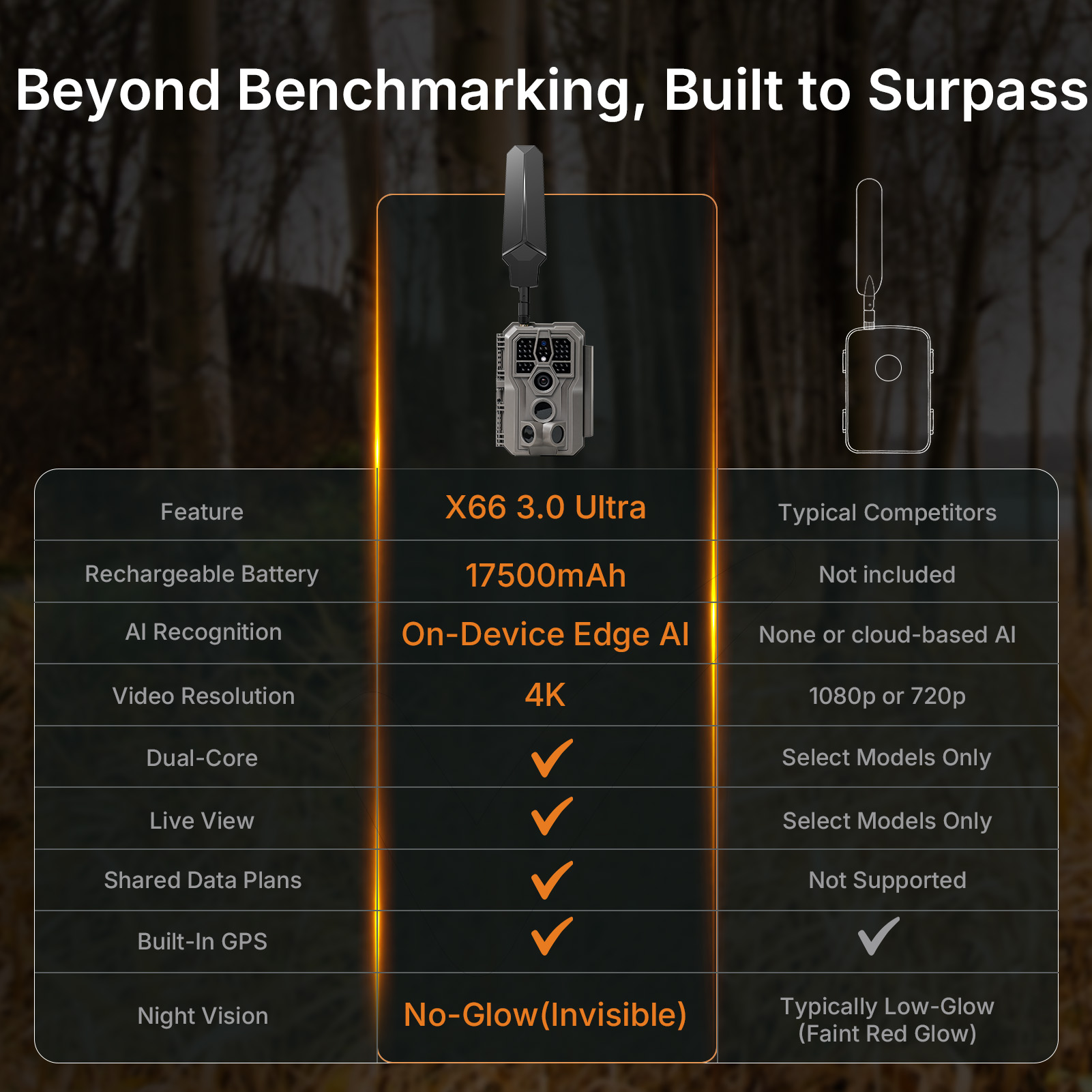
In Short
The GardePro X66 3.0 Ultra is the ultimate cellular trail camera for users who want maximum runtime, smarter monitoring, and fewer maintenance trips.
With its included 17,500mAh rechargeable lithium battery, Dual-Core Technology, EDGE AI intelligence, and True 4K Ultra HD Video, the X66 3.0 Ultra delivers unmatched performance for demanding outdoor applications.
Whether monitoring wildlife throughout a season or deploying a camera year-round, the X66 3.0 Ultra provides the power, intelligence, and reliability needed for professional-level monitoring.
For maximum independence, pair it with the SP1000 10W Solar Panel for continuous operation throughout the year.
👉 Order your GardePro X66 3.0 Ultra now →
Updated on 28 Aug 2026
Is it helpful to you?
Thanks for your feedback
-
Envío gratisEnvío global gratuito en pedidos superiores a $50.
-
Garantía de 2 añosOferta exclusiva de la tienda GardePro.
-
Soporte en vivo las 24 horas, los 7 días de la semanaEl equipo de posventa 7x24 horas resolverá sus problemas.
-
Devolución del dineroGarantía de devolución de 30 días.
- Al elegir una selección, se actualiza la página completa.
- Se abre en una nueva ventana.