
Looking for Help?
Find answers to your questions
- Why does my phone pick up the LEDs if they're invisible?
- Why isn’t the solar panel charging, or why is the red light flashing or off?
- Why does the camera show the charging icon, but the battery level continues to decrease
- Why doesn’t the camera display the charging or plug icon after the solar panel is connected?
- Camera Installation Guide
- What Should I Do When the SD Card Is Full?
- How Can I Check If My SD Card Is Full?
- What Does the Number in the Upper Right Corner Mean?
- What Is the “Reduce Blur” Setting?
- How Should I Set the “Overexposure Suppression” Level?
- What Is Overexposure Suppression?
- Why doesn't my camera work during the Operation Hours I set?
- How long can 8 AA batteries last in photo-only mode?
- Why does my camera get stuck on "PC Camera" during a firmware update?
- Why Does My Camera Fail to Turn On and Make a Buzzing Sound?
- Why Is My Camera Screen Flickering, White, or Black?
- Why Are My Camera Photos or Videos Black and White at Night?
- Why Does the Camera Only Take Photos or Record Short Videos?
- Does a lower firmware version number indicate a firmware downgrade?
- How to Choose the Right Solar Panel for Your GardePro Camera?
- What should I do if the camera keeps saying "No SD Card"?
- What Is GardePro Edge AI and How Does AI Work on Trail Cameras
- How to Choose Trail Camera Settings for Different Wildlife Scenarios
- What Should I Do If My Trail Camera Keeps Turning Off?
- How can I enable the time-lapse function on the camera?
- How can I set the camera to work at a specific time?
- Why is my camera not recognized when connected to my computer?
- Why Doesn’t My Camera Take Photos at Night?
- Why Do Video Numbers Mismatch and Videos Fail to Play?
- Why Does the Screen Show “MCU Upgrading” When the Camera Powers On?
- Battery life is shorter than expected
- Camera won't power up
- Can an external power source and internal 8 batteries work together?
- FAQ about GardePro 8000 mAh Rechargeable Battery Pack
- FAQ about SD Cards
- FAQ on Reducing Trigger Delays / Slow Trigger for Wildlife Trail Camera
- How to choose the right solar panel for your camera
- How to reset the password?
- How to troubleshoot condensate, fog, or moisture on the camera lens?
- How to use 12V AC/DC Power Adapter for GardePro A3, A3S
- LED Glass / PIR Sensor Broken
- Resolving "No Firmware Available" Message
- The Camera Date&Time not saved
- The camera leak
- The camera screen has stripes/lines
- The tracking camera shows "low voltage"
- Troubleshooting Temperature Display Issues
- When I turn on the camera, the screen just continually flashes white
- Why does the camera show a black and white image instead of color at startup
- Why is it that I turn the camera on but the screen doesn't light up, the screen is black.
- Amazon Replace/Resend the product
- How to assemble the wall mount and install a camera with the wall mount ?
- How to estimate the wireless communication distance?
- How to locate and solve the disconnection issue?
- How to use GardePro A3S ?
- Solutions to special cases when using the camera
- What is the GardePro T5 and T6 Series?
-
Trail Camera Photo&video Problems
- How to Improve Night Videos Too Dark
- Night Picture Background Too Dark? Here's How to Improve It
- The pictures are cut off by grey
- Troubleshooting Short Night Videos on Your Trail Camera
- Why are the colour tones of pictures taken by the same camera not uniform?
- Why don't some of my cameras show as "Online" in the app?
- Why Does My Camera Not Have an APN Setting?
- How to Set Up APN on a SIM-Free Cellular Trail Camera?
- Why Is My Live Cellular Camera Showing Offline?
- Why Does My 4G Camera's Cellular Info Page Not Display Any Information?
- Why Does Live View Take 10–15 Seconds to Display Video with a Customer-Provided SIM Card?
- What is Dual-Core Technology?
- Why Does “Invalid SIM Card” Appear on SIM-Free Cellular Cameras?
- Can I Track My Stolen Cellular Camera?
- What Happens to My Subscription if My 4G Cellular Camera Is Stolen?
- Why Does My Cellular Trail Camera Show an X Instead of a Signal Bar?
- Can I Transfer My Cellular Data Plan to a New Camera?
- How to Purchase a Cellular Data Plan Outside the GardePro App?
- Why Doesn’t the QR Code Work?
- Why Is the QR Code Not Showing on My Cellular Trail Camera?
- Can I Use an Add-On Without a Main Plan?
- Can I get a price adjustment for the wrong subscription purchase?
- Is there any obligation when I purchase a photo subscription?
- Why is there no sound in my video?
- How to cancel or remove a data plan?
- 4G module upgrade instructions
- Failed activation solution for GardePro cellular trail camera Pre-installed SIM card
- GardePro 4G Cellular LTE Data Plan
- GardePro Cellular Trail Camera Model Comparison
- GardePro Cellular Trail Camera Supported 4G LTE cellular networks
- GardePro cellular trail camera Unsupported SIM Cards for Freedom Model Cameras
- GardePro cellular trail camera's Cellular Transfer function
- GardePro cellular trail cameras activation notes
- GardePro X60P Live Max, X60PLMB, or X60 Pro Max experiences unreasonable false triggers
- Global 4G LTE cellular networks corresponding to SIM mode IR
- How to check if your country can use GardePro cellular trail camera
- How to quickly test if the Celluar trail camera is connected properly to the App
- How to select the Sim Mode on your mobile phone
- How to tell if your cellular Trail camera model
- What's special about Freedom Unlocked SIM-free model
- Why Does My GardePro X66 Pro Use Battery Faster
- X60P Live Max Quick Activation Guide
- Activate GardePro 4G Cellular LTE Trail Camera Freedom
- Celluar Camera firmware and MCU module upgrade
- GardePro Cellular Camera Model Comparison: X60PMB vs X50MB vs X20
- X66 Series Camera Activation Guide
- What is the WiFi Direct Connection Range?
- What affects Direct WiFi Connection distance?
- What can you do with Direct Connection Mode?
- How does WiFi Direct Connection work?
- What is WiFi Direct Connection?
- Why Are Only 40 Photos Showing in the App?
- Can I Turn Off My WiFi Camera Through the App?
- What Is the Difference Between a WiFi Trail Camera and a Home WiFi Security Camera?
- Can I use my WiFi camera as a non-cellular trail camera?
- Why Can’t I Connect to My WiFi Trail Camera on iOS 26?
- Why won’t my app connect to my WiFi trail camera?
- How to Update Firmware on WiFi Trail Cameras with Built-in Storage
- How to Fix Live View Issues on WiFi Trail Cameras (iPhone 17)
- Can I View Wi-Fi Trail Camera Photos Remotely?
- How to Live Stream on Twitch with the GardePro WiFi Camera
- How to Quickly Activate Your WiFi Camera?
- QUICK START GUIDE For Wi-Fi Trail Camera-WiFi-Trail-Camera-QUICK-START-GUIDE
- The difference between GardePro WiFi trail camera and GardePro cellular trail camera
- Understanding GardePro Wi-Fi & Bluetooth Connection Technology
- When the Wifi&Cellular camera encounters some unsolvable issues
- When the Wifi&Cellular camera encounters some unsolvable issues
- Why can't I use the Live stream of the WiFi camera (ios)
- Wi-Fi connected, but can't see any camera information and can't preview
- How Do Walls, Height, and Trees Affect the GardePro Link Hub and Camera Signal?
- Will Placing My Router Inside a Closet or Enclosed Space Affect the GardePro Link Hub Connection?
- What Should I Do if the Link 1.0 Hub Firmware Update Fails at 100%?
- Do I Need to Request a Video Preview in the Link System?
- What Do the Hub Indicator Lights Mean During Troubleshooting?
- What Should I Do if My Hub Goes Offline After a Power Outage?
- What should I do if R3 Pro is stuck at 98% during firmware update?
- How is the Link Hub powered?
- What should I do if my paired R3 Pro camera frequently goes offline while the Hub stays online?
- Can I use the Link 1.0 Hub with other GardePro trail cameras?
- How do I determine my Link Hub's network connection status using the LED indicator lights?
- What if the Link Hub Shows a Solid Blue Light?
- Can I use an external antenna to improve the signal reception of my R3 Pro camera?
- What Does the Blinking Green Light on the Hub Mean?
- Why can't I add my Hub to the app?
- How to Set Up and Connect Your GardePro Link System: A Step-by-Step Guide
- Link 1.0 (R3 Pro+Hub)-FAQs
- R3 Pro Firmware Update Guide(Fix Network Issue)
-
Cellular Camera
- X66 3.0 Ultra - Product Overview
- X66 Pro Max - Product Overview
- X66 Pro - Product Overview & Feature Guide
- A80 Series - Product Overview
- E9 2.0 Series - Product Overview
- E6 2.0 Series – Product Overview
- E6+ Product Overview
- E8 2.0 Series - Product Overview
- How Can I See the Solar Panel’s Battery Level in the App?
- How to Share Photos and Videos
- How Do I Add a Payment Method?
- How Do I Set a Default Payment Method?
- How Do I Remove a Payment Method?
- What Does Error 205 Mean When Using “Take a Photo”?
- Why am I not receiving the verification code email during registration or sign-in?
- GardePro Edge AI - FAQ
- AI Tags Feature Guide
- Smart Capture Feature Guide
- Take a Photo (Diagnostic) Feature Guide
- How to Request and Download HD Video Clips
- Camera Sharing Feature Guide
- Firmware Upgrade Reference Table for GardePro Trail Camera
- GardePro App for Cellular Trail Camera
- GardePro App for WiFi Trail Cameras?
- GPS Feature Guide
- How to clear GardePro app cache
- How to Download 4G Camera Photos or Videos to Your Phone Gallery
- How to resolve payment-related issues with the GardePro data plan
- How to select all and delete all in app gallery
- How to upgrade the firmware of GardePro trail cameras
- Shared Plan Guide
- Understand the Cellular transfer Settings in the GardePro Mobile App
- Understanding the Basic Settings and Advanced Settings in the GardePro Mobile App
- Video Preview Feature Guide
- Worry-Free Delivery Protection and Claims Guide
- How do GardePro gift cards work?
- Return shipping costs & conditions
- Can I change my shipping address after placing an order?
- Do you offer free shipping?
- How long does it take to process and ship my order?
- Why did my payment fail, and how can I fix it?
- Is my payment information secure?
- What payment methods do you accept?
- GardePro Credits Rewards Program Customer Guide: How to Earn & Redeem Credits
- GardePro Global Shipping Destinations and Delivery Times
- GardePro Warranty Information
- Return & Refund Policy
- What's the difference between Tax and Duty
- GardePro Mobilfunk-Trail-Kamera X20 Handbuch
- GardePro Mobilfunk-Trail-Kamera X20WF Handbuch
- GardePro Mobilfunk-Trail-Kamera X50 Handbuch
- GardePro Mobilfunk-Trail-Kamera X50MB Handbuch
- GardePro Mobilfunk-Trail-Kamera X60P Handbuch
- GardePro Mobilfunk-Trail-Kamera X60PLMB Handbuch
- GardePro Mobilfunk-Trail-Kamera X60PMB Handbuch
- GardePro Wildkamera A3S Handbuch
- GardePro Wildkamera A5 Handbuch
- GardePro Wildkamera A5WF Handbuch
- GardePro Wildkamera E5S Handbuch
- GardePro WLAN-Wildkamera E6 Handbuch
- GardePro WLAN-Wildkamera E6P Handbuch
- GardePro WLAN-Wildkamera E6PCF Handbuch
- GardePro WLAN-Wildkamera E6PMB Handbuch
- GardePro WLAN-Wildkamera E8 Handbuch
- GardePro WLAN-Wildkamera E8P Handbuch
- GardePro WLAN-Wildkamera E8PMB Handbuch
- GardePro WLAN-Wildkamera E8PWF Handbuch
- GardePro WLAN-Wildkamera E9 Handbuch
- GardePro WiFi Trail Camera E6 2.0 Instuction Manual
- GardePro WiFi Trail Camera A80 Instuction Manual
- GardePro WiFi Trail Camera E6 Instuction Manual
- GardePro WiFi Trail Camera E6P Instuction Manual
- GardePro Wifi Trail Camera E6PCF Instuction Manual
- GardePro WiFi Trail Camera E6PMB Instuction Manual
- GardePro WiFi Trail Camera E7 Instuction Manual
- GardePro WiFi Trail Camera E8 Instuction Manual
- GardePro WiFi Trail Camera E8P Instuction Manual
- GardePro WiFi Trail Camera E8PCF Instuction Manual
- GardePro WiFi Trail Camera E8PMB Instuction Manual
- GardePro Wifi Trail Camera E8PWF Instuction Manual
- GardePro WiFi Trail Camera E9 Instuction Manual
- GardePro WiFi Trail Camera E9P-E9PWF-E9PCF-E9P MAX Instuction Manual
- GardePro X60P-X60PWF-X60PCF-X60P MAX Manuale di istruzioni V1.0 EN+LT
- GardePro Cellular Trail Camera X20 Instuction Manual
- GardePro Cellular Trail Camera X20WF Instuction Manual
- GardePro Cellular Trail Camera X50 Instuction Manual
- GardePro Cellular Trail Camera X50MB Instuction Manual
- GardePro Cellular Trail Camera X60P Instuction Manual
- GardePro Cellular Trail Camera X60PLMB Instuction Manual
- GardePro Cellular Trail Camera X60PMB Instuction Manual
- GardePro Cellular Trail Camera X66 Pro Instuction Manual
- GardePro N5 NIGHT VISION GOGGLES Instruction Manual V1.0 EN 20240224
- GardePro Solar Panel SP300 Instruction_Manual_v1.0_EN
- GardePro Solar Panel SP350 Instruction_Manual_v1.0_EN
- GardePro Trail Camera A3S Instuction Manual
- GardePro Trail Camera A5 Instuction Manual
- GardePro Trail Camera A5WF Instuction Manual
- GardePro Trail Camera A60 4K Instuction Manual
- GardePro Trail Camera E5S Instuction Manual
- About Wall Mount Bracket Assembly
- Discover exclusive discounts for Gardepro
- Firmware Update for Camera
- Firmware Update for monitor
- GardePro Baby Monitor B3 - Instruction Manual
- GardePro Baby Monitor Product FAQ
- How to install a wall mount
- Q1: How to operate in the menu?
- Q10: Where to buy a camera?
- Q11: Will this work on the 5g network or the Wi-Fi network?
- Q12: Can it also connect to your phone?
- Q13: Does the camera part need to be plugged in?
- Q14: Will it block out the white noise machine?
- Q15: Will this camera notify you when there is motion in the room?
- Q16: What does the blinking green light on the baby unit camera mean?
- Q17: What is the resolution of the baby camera and monitor?
- Q18: How will the alarm/alert detection affect the system?
- Q19: How can I set the Sound detection?
- Q2: How to update the baby monitor?
- Q20: If the monitoring screen is not clear at night, the night vision effect is not good?
- Q21: If there exists a whistling/howling phenomenon after opening the monitoring screen?
- Q22: What if the surveillance screen is always black and white, or is it pitch black at night?
- Q23: How to turn on multiple cameras in Patrol/Scan mode?<
- Q24: How to place the camera on the wall?
- Q25: What is the longest connection distance?
- Q26: How to do when the monitor cannot turn on?
- Q27: What do the screen sleep parameters mean?
- Q29: Can I review the video a day before?
- Q3: How to play and stop lullabies?
- Q30: How can I copy the data from the camera to my phone / pc?
- Q31: How can I estimate the wireless communication distance betwwen the monitor and camera ?
- Q4: How to adjust the Speak/Talk volume of a camera?
- Q5: How to adjust the alarm volume of the monitor?
- Q6: How to adjust the lullaby volume of the camera?
- Q7: How to adjust the screen’s brightness?
- Q8: How can i add a new camera to the network?
- Q9: Is this monitor 720p or 1080p?
- Q19: How can I set the Sound detection?
- Q20: If the monitoring screen is not clear at night, the night vision effect is not good?
- Q21: If there exists a whistling/howling phenomenon after opening the monitoring screen?
Table of Contents
How Do I Add a Payment Method?
Table of Contents
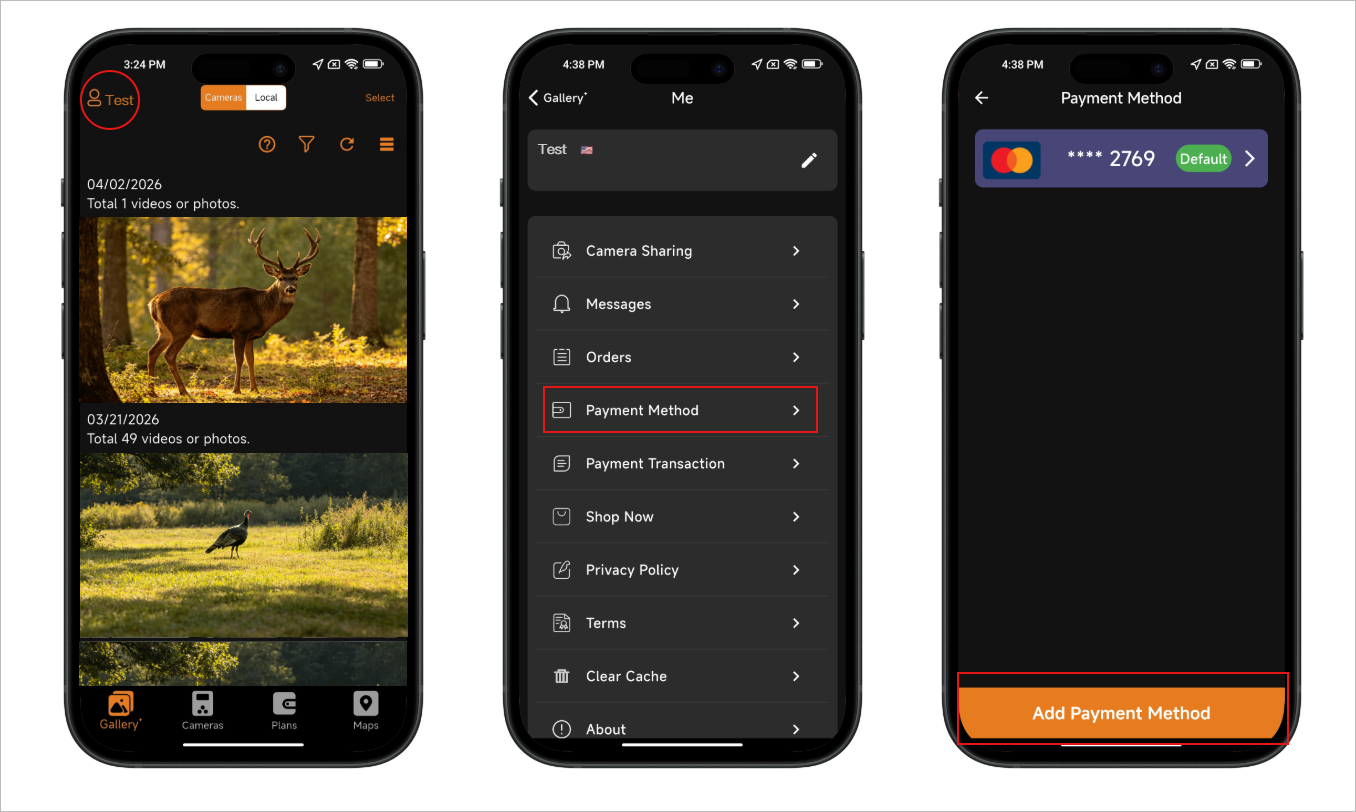
You can add a new payment method in either of the following ways:
Method 1: From Payment Method Settings
- Open the GardePro Mobile app and log in.
- Tap the Profile icon in the top-left corner, then tap your Account Name.
- Tap Payment Method.
- Tap the Add Payment Method button at the bottom to add a new payment method.
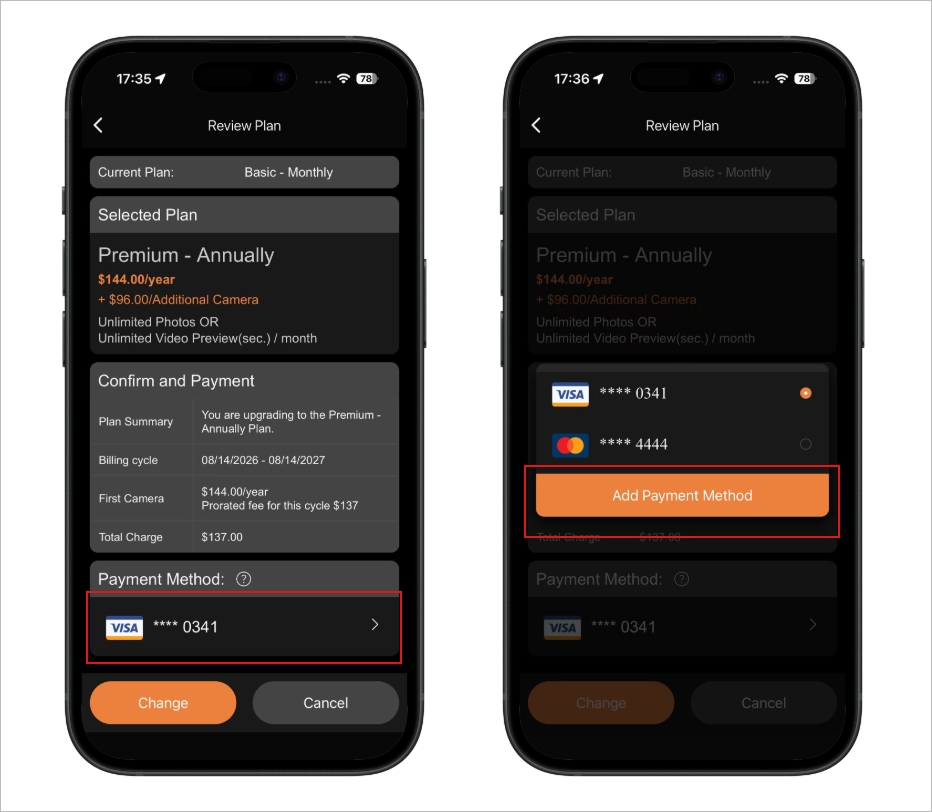
Method 2: When Changing Your Plan
- During the Change Plan process, on the Review Plan page.
- Tap the current payment method.
- In the pop-up window, tap Add Payment Method to add a new payment method.
If your problem still cannot be solved, please contact us.
Updated on 14 Aug 2026
Is it helpful to you?
Thanks for your feedback
-
Free ShippingFree global shipping on orders over $50.
-
2-Year WarrantyGardePro Shop Exclusive Offer.
-
24/7 Live Support7x24-hour after-sales team will solve your problems.
-
Money Back30 days return guarantee.
- Choosing a selection results in a full page refresh.
- Opens in a new window.